
Loading...

And the final countdown has begun!

As announced in Dreamforce ’21, Process Builder and Workflow rules are set to bid adieu forever after 2022.

This means that you will no longer be able to create automation using PB or WFR at the end of 2022. Instead, you will have to use Flows to create automation.

Naturally, this piece of overwhelming news is raising speculations such as

  • What will happen to the existing workflows?
  • Will we be able to create new workflow rules in 2023?
  • And the most important one, how can we migrate our current existing workflows in Flows?

So, Salesforce released a Workflow Rules and Process builder Retirement timeline that presents a roadmap for the retirement plan.

Workflow Rules and Process builder Retirement timeline

To clarify your doubt, yes, your existing workflows will continue to exist. You may not be able to create new ones after 2022, but will surely be able to edit them.


As far as migrating workflows to flows is concerned, Salesforce has introduced migration tools to convert Workflow Rules and Process builders to Flows. These tools are rolled out in different release cycles, such as

  • Workflow Migration tools- announced in Spring ’22.
  • Process Builder Migration- announced in Summer ’22.
  • Turning off WFRs and PB -> Winter ’23 and Spring ‘23 respectively
  • End of Support- Estimated 2025

Know more about Migrate to Flow tool

Workflow migration tools

You may start transitioning to Flow Builder with the workflow migration tools. With the migration tool, you can easily convert your WFRs into Flow.

Released in Spring ’22, Migrate to Flow tool is generally available and contains the following items-

  • Field updates
  • Time-dependent workflow actions
  • Email alerts
  • Field-based criteria
  • Outbound messages
  • Rule criteria formula that’s set to true

Process Builder Migration tool

In Summer ‘22 release cycle, the update ensures that you can evaluate criteria based on the original record values in Process Builder.

The Migrate to Flow tools got enhanced with features that support


  • Rule criteria formula
  • Equal to null
  • Not equal to null

However, rule criteria using parameters such as TimeNow, TimeValue, Hour, Minute, Second, IsClone, or $RecordType are currently not supported.

Steps to convert WFRs into Flows

  • First, Go to Set up→ Quick Find box → Type Migrate to Flow,
  • Select Migrate to Flow.

Alternatively, right from your workflow rules page, go to Set up and click Migrate your Workflow rules to Flow.

Select a workflow rule (1) and click Migrate to Flow (2).

salesforce, salesforce flow, work flow, process builder, salesforce work flow

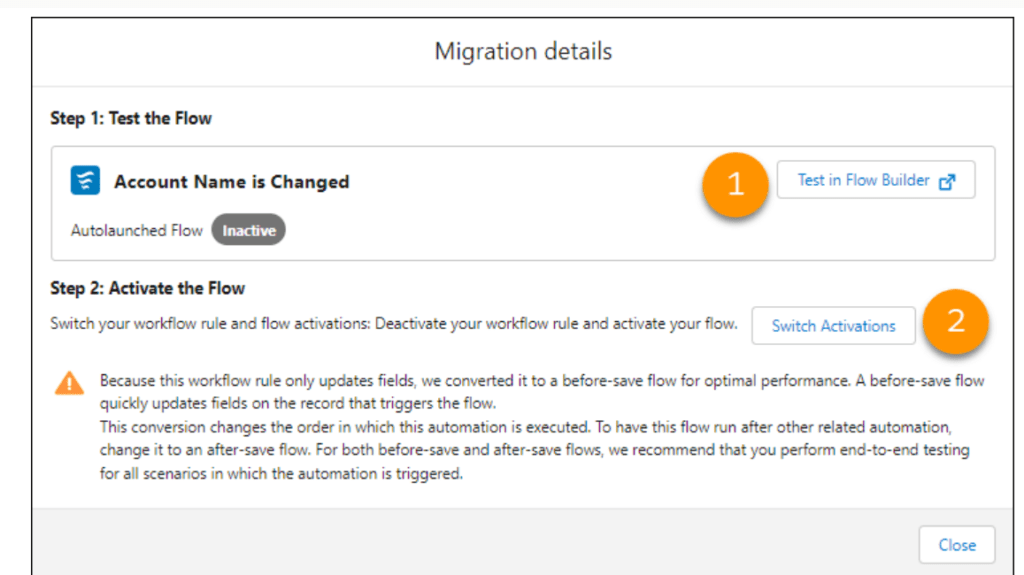
Now, it’s time to test your resulting flow in Flow Builder (1).

salesforce, salesforce flow, work flow, process builder, salesforce work flow

After that, deactivate the converted WFR and activate the new flow(2).

Wrap Up

As Workflows rules have been around for a long time, it will be quite a task to migrate automation to Flows. However, Salesforce’s guided roadmap and tools will definitely make the transition smoother.

If you need help with Flow migration or any other Salesforce Consulting Services, please feel free to reach out to HIC Global Solutions anytime!!

No Data Found.

Related Articles
Design and Implementation of Salesforce Jira Task Integration 1 1

Businesses have been using Salesforce for CRM operations and Jira for Agile project tracking. However, without integration, teams manually update both systems, leading to data inconsistency and inefficiency.This mechanism establishes a real-time integration between Salesforce and Jira, allowing seamless synchronization of tasks and agile board statuses.  A custom Salesforce dashboard was developed that replicates Jira-style […]

Read More

Dark Mode in Salesforce Enabling It and Creating Theme Ready Lightning Web Components with SLDS 2.0 1 1

With the Winter ’26 release, Salesforce introduced Dark Mode in Lightning Experience. Dark Mode has been introduced as a beta feature in Winter ’26, and at first it was available only for Starter Edition orgs. It is now rolling out further with Spring ’26 to Professional, Enterprise, and Developer editions. To use Dark Mode, Salesforce […]

Read More
How to Merge and Brand PDF Files in Salesforce Using LWC Visualforce PDF LIB 1

Salesforce developers frequently encounter document automation requirements that go beyond standard Apex-based PDF generation. From merging multiple ContentVersion files to dynamically applying branding like watermarks and headers, traditional server-side approaches often hit Salesforce heap size limits (6MB/12MB), creating performance and scalability challenges. This guide presents a heap-limit-safe PDF merging architecture in Salesforce using Lightning Web […]

Read More
Building a Reusable Popup Modal Architecture in Salesforce LWC 02 1

Modern Salesforce applications frequently rely on popup modals for confirmations, warnings, access control decisions, and destructive actions. However, building modal logic separately inside every Lightning Web Component often leads to duplicated code, inconsistent user experiences, and growing technical debt. This blog introduces a flexible popup modal architecture in Lightning Web Components (LWC) that centralizes modal […]

Read More
How to Add a Lookup Recipient in a Sign Template

This step-by-step guide will provide you with quick steps on how to add a lookup recipient inside a sign template in just a few easy steps. This process improves your eSignature for Salesforce workflow by pulling recipients directly from related records. Whether you rely on Salesforce digital signature features or any eSignature integration, adding lookup […]

Read More
Agentforce VS code

As Salesforce continues to move toward AI-assisted development, Agentforce is emerging as a powerful tool that helps developers interact with their org metadata, objects, and configurations using intelligent prompts. When combined with Visual Studio Code (VS Code) and the Salesforce CLI, Agentforce enables a faster, more context-aware way to explore and build on the Salesforce […]

Read More
Our Location worldwide
Indian Flag India
3rd Floor, A-10, Pegasus Tower, Sector 68, Noida, Uttar Pradesh 201301 +91-1203239658
United States of America Flag USA
333 West Brown Deer Road Unit G – 366 Milwaukee WI, USA 53217 +1(262) 310-7818
United Kingdom Flag UK
7 Bell Yard, London, WC2A 2JR +44 20 3239 9428
Canada Canada
HIC Global Solutions INC
6D - 7398 Yonge St #1124 Thornhill, ON L4J 8J2 Canada +1(262) 310-7818