
Loading...

Integrating Facebook Messenger with Salesforce enables businesses to connect better with their customers.Leveraging both the platforms, you can achieve some major customer service goals like.

  • Sending personalized messages to woo your customers
  • Interact with your consumers via multiple channels
  • Improve business efficiency by creating custom workflows

So, if these benefits have got you excited to connect your Facebook Messenger with Salesforce, here is our quick solution to do so.

Without much ado, let’s straight jump in to learn how to integrate Facebook Messenger with Salesforce in just a few simple steps.

Step By Step Guide Facebook Messenger and Salesforce Integration

Follow through these simple steps to connect your Facebook Messenger with Salesforce quickly and easily.

  1. Go to Setup, enter Messaging in the Quick Find box, and select Messaging Settings.
1 1212650d06

Now enable messaging and in the Channels section, click New Channel.

2 1212770732

3.  Click Start.


4. Click Facebook Messenger.

3 1212864325

5. Click Authenticate Facebook.

4 12129c2905

6. Now you have to enter your Facebook username and password.

7. Click on the page to integrate (you can only select one page at a time). To set up more Facebook pages, repeat the flow.

8. Now, click on Next.

9. In the Chat Acknowledgement field, enter a message that’s sent in response to the customer’s initial text message.

10. Click on Next.

Note: For setting the omnichannel to re-route the message to agents, bots, or third parties, you should create a new queue.

11. To re-route the configuration, follow these steps-

  1. Create a queue.
  2. Create a routing configuration.
  3. Adjust the agent messaging workload.
  4. Click on Done.

12. To close the setup flow, click Finish.

Conclusion

There you have it! Your easy, no-code solution to integrate your Facebook Messenger with Salesforce. Also, Stay tuned with us for more such Salesforce development solutions. We will catch you in the next one!

No Data Found.

Related Articles
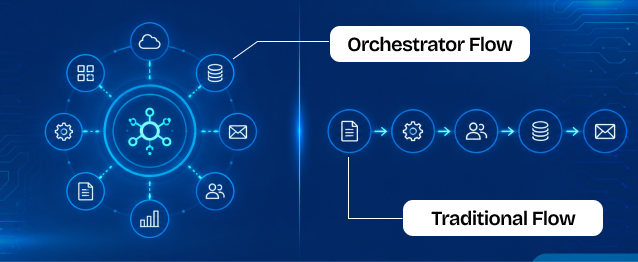
Orchestrator vs. Traditional Flows

Businesses use Salesforce automation to reduce manual work, improve efficiency, and automate repetitive business processes. Two commonly used automation approaches inside Salesforce are Traditional Flows and Flow Orchestrator. Traditional Flows are mainly used for simple automation tasks such as updating records, sending notifications, creating tasks, and automating business logic. Flow Orchestrator is designed for more […]

Read More

The Rise of Agentic Government_ What Salesforce’s 2026 Insights Mean for the Future of Public Sector AI

Government technology has often been seen as slower to evolve than the private sector. But Salesforce’s latest research challenges that idea in a big way. In fact, the new findings suggest that public sector organizations may now be moving faster than many businesses when it comes to adopting AI agents and preparing for a more […]

Read More

How To Use Email Service in APEX

Managing approvals, updates, and record changes directly from email can significantly improve efficiency within Salesforce workflows. Instead of logging in, navigating records, and manually updating fields, users can simply respond to emails and trigger automated updates using Email Service in APEX. This approach is especially useful for businesses leveraging Salesforce automation and looking to enhance […]

Read More

Design and Implementation of Salesforce Jira Task Integration 1 1

Businesses have been using Salesforce for CRM operations and Jira for Agile project tracking. However, without integration, teams manually update both systems, leading to data inconsistency and inefficiency.This mechanism establishes a real-time integration between Salesforce and Jira, allowing seamless synchronization of tasks and agile board statuses.  A custom Salesforce dashboard was developed that replicates Jira-style […]

Read More

Dark Mode in Salesforce Enabling It and Creating Theme Ready Lightning Web Components with SLDS 2.0 1 1

With the Winter ’26 release, Salesforce introduced Dark Mode in Lightning Experience. Dark Mode has been introduced as a beta feature in Winter ’26, and at first it was available only for Starter Edition orgs. It is now rolling out further with Spring ’26 to Professional, Enterprise, and Developer editions. To use Dark Mode, Salesforce […]

Read More
How to Merge and Brand PDF Files in Salesforce Using LWC Visualforce PDF LIB 1

Salesforce developers frequently encounter document automation requirements that go beyond standard Apex-based PDF generation. From merging multiple ContentVersion files to dynamically applying branding like watermarks and headers, traditional server-side approaches often hit Salesforce heap size limits (6MB/12MB), creating performance and scalability challenges. This guide presents a heap-limit-safe PDF merging architecture in Salesforce using Lightning Web […]

Read More
Our Location worldwide
Indian Flag India
3rd Floor, A-10, Pegasus Tower, Sector 68, Noida, Uttar Pradesh 201301 +91-1203239658
United States of America Flag USA
333 West Brown Deer Road Unit G – 366 Milwaukee WI, USA 53217 +1(262) 310-7818
United Kingdom Flag UK
7 Bell Yard, London, WC2A 2JR +44 20 3239 9428
Canada Canada
HIC Global Solutions INC
6D - 7398 Yonge St #1124 Thornhill, ON L4J 8J2 Canada +1(262) 310-7818