Loading...

LeanData is a fantastic tool with great features that help maintain good data hygiene and ensure data quality in Salesforce for the success of any organization. It is highly recommended for both small and large companies, regardless of their use case.

The visual interface of LeanData is user-friendly, allowing users to easily see how their company’s lead rules are set up. It also provides flexibility in building flow charts for Leads, Accounts, Contacts, Opportunities, Cases, and Custom Objects, making it a versatile solution.

Key features and benefits of LeanData


  • Automated lead routing and intelligent matching capabilities, streamline operations and save time and effort. This tool addresses common issues such as inaccurate lead assignments, lack of visibility, and troubleshooting problems.
  • Lead-to-account (L2A) matching capabilities, which contribute to accurate lead assignments. The drag-and-drop functionality within the graph builder simplifies the process of creating and managing lead rules.
  • LeanData provides useful analytics overlaid on the graphs, allowing users to monitor the routing of leads and identify any errors that may occur.

LeanData Matching & Tagging

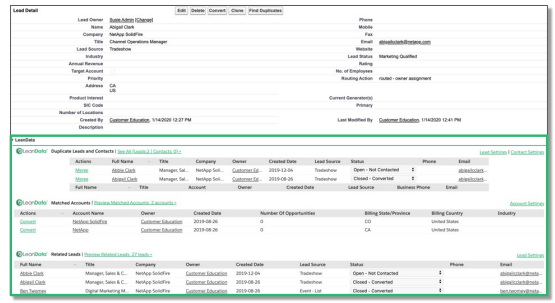
Leandata offers a feature called “Matching & Tagging,” which helps in accurately matching leads to accounts and automatically tagging them based on certain criteria. This process ensures that leads are appropriately associated with the correct accounts, which is crucial for effective lead management.

LeanData Matching:

Here is the related context without LeanData

Here is the related context without LeanData

with LeanData:

with LeanData

By default, Leandata considers the following fields for matching: 1. Company name 2. Account name 3. Email 4. Website 5. phone number 6. Address.

Tagging

The LeanData Tagging feature is designed to associate and update leads with matched accounts. It creates the lookup link with matched accounts and updates Leads. Filters and Tiebreakers are two terms used in tagging. Tiebreakers are used after filters have been applied. Tiebreakers are used after the filter. It automatically tags the leads with relevant and corresponding account information. This tagging Updates

  1. Reporting Matched Account
  2. Matched Account Owner
  3. Matched Account Type
  4. Matched Account Industry
  5. Matched Account Status
  6. Matched Account Opps
  7. Matched Account Segment

Routing

The “Routing” feature in Leandata allows businesses to automate the distribution of leads among their sales representatives or teams. It ensures that the right leads are assigned to the most suitable salesperson based on predefined rules or criteria, enabling faster response times and better lead conversion rates.

Salesforce Assignment Rules vs. LeanData Routing Complex:

Salesforce Assignment Rules are

  • Difficult to comprehend/maintain
  • Low visibility
  • difficult to validate & troubleshoot
  • Limited to criteria found on the routed record Complex

Whereas, LeanData Routing Complex is-

  • Easier to see and comprehend
  • Real-time visibility into distribution
  • Quick adjustments and troubleshooting

While LeanData is known for its lead management and routing capabilities, it can be used to route more than just leads. LeanData routing functionality can be applied to Contacts, Opportunities, Accounts, and Cases.

Nodes:

Nodes – The Building Blocks of LeanData Router have different Node Types:

  • Entry Nodes • Decision Nodes • Match Nodes • Action Nodes
Territories Management

Territories Management

Territory Management is a critical aspect of sales operations, especially for companies with regional or geographic sales structures. Leandata’s “Territories Management” feature helps in defining, organizing, and managing sales territories, ensuring a balanced distribution of leads and opportunities among sales representatives.

Notification Features

Notification Features:

Leandata offers various notification features to keep sales teams informed and engaged. These notifications can include real-time alerts about new leads, important lead updates, or task reminders to ensure timely follow-ups and actions.

Send Notification Node:

This standalone Send Notification Node allows you to send a notification without having to first act on a record.

Send Notification Node

Routing Insights & Audit Log:

The “Routing Insights & Audit Log” feature in Leandata provides valuable insights and data visualizations related to lead management and sales performance. These insights help sales leaders make data-driven decisions and optimize their processes for better outcomes. 

  • Routing Insights: Inefficiencies and gaps in routing are identified by Routing Insights. Outcomes are identified using Routing Insights. 1. Successfully Actioned Records 2. Stopping Records 3. Error Occurring During Action
  • Audit Log: Audit Logs Trace Individual Records for Troubleshooting Audit Logs – Troubleshooting Example:
Routing Insights Audit Log

Conclusion:

LeanData is a powerful tool that addresses data hygiene issues and data quality concerns in Salesforce, making it an invaluable asset for organizations aiming for success.

We hope this blog helps you get started with Lean Data and explore the platform more. HIC Global Solutions is a proud partner of Leandata helping businesses get the most out of their data. Feel free to reach out to us if you need help using Lean Data in Salesforce. 

And for more insightful blogs from us, stay tuned!

No Data Found.

Related Articles
Orchestrator vs. Traditional Flows

Businesses use Salesforce automation to reduce manual work, improve efficiency, and automate repetitive business processes. Two commonly used automation approaches inside Salesforce are Traditional Flows and Flow Orchestrator. Traditional Flows are mainly used for simple automation tasks such as updating records, sending notifications, creating tasks, and automating business logic. Flow Orchestrator is designed for more […]

Read More
The Rise of Agentic Government_ What Salesforce’s 2026 Insights Mean for the Future of Public Sector AI

Government technology has often been seen as slower to evolve than the private sector. But Salesforce’s latest research challenges that idea in a big way. In fact, the new findings suggest that public sector organizations may now be moving faster than many businesses when it comes to adopting AI agents and preparing for a more […]

Read More
How To Use Email Service in APEX

Managing approvals, updates, and record changes directly from email can significantly improve efficiency within Salesforce workflows. Instead of logging in, navigating records, and manually updating fields, users can simply respond to emails and trigger automated updates using Email Service in APEX. This approach is especially useful for businesses leveraging Salesforce automation and looking to enhance […]

Read More
Design and Implementation of Salesforce Jira Task Integration 1 1

Businesses have been using Salesforce for CRM operations and Jira for Agile project tracking. However, without integration, teams manually update both systems, leading to data inconsistency and inefficiency.This mechanism establishes a real-time integration between Salesforce and Jira, allowing seamless synchronization of tasks and agile board statuses.  A custom Salesforce dashboard was developed that replicates Jira-style […]

Read More
Dark Mode in Salesforce Enabling It and Creating Theme Ready Lightning Web Components with SLDS 2.0 1 1

With the Winter ’26 release, Salesforce introduced Dark Mode in Lightning Experience. Dark Mode has been introduced as a beta feature in Winter ’26, and at first it was available only for Starter Edition orgs. It is now rolling out further with Spring ’26 to Professional, Enterprise, and Developer editions. To use Dark Mode, Salesforce […]

Read More
How to Merge and Brand PDF Files in Salesforce Using LWC Visualforce PDF LIB 1

Salesforce developers frequently encounter document automation requirements that go beyond standard Apex-based PDF generation. From merging multiple ContentVersion files to dynamically applying branding like watermarks and headers, traditional server-side approaches often hit Salesforce heap size limits (6MB/12MB), creating performance and scalability challenges. This guide presents a heap-limit-safe PDF merging architecture in Salesforce using Lightning Web […]

Read More
Our Location worldwide
Indian Flag India
3rd Floor, A-10, Pegasus Tower, Sector 68, Noida, Uttar Pradesh 201301 +91-1203239658
United States of America Flag USA
333 West Brown Deer Road Unit G – 366 Milwaukee WI, USA 53217 +1(262) 310-7818
United Kingdom Flag UK
7 Bell Yard, London, WC2A 2JR +44 20 3239 9428
Canada Canada
HIC Global Solutions INC
6D - 7398 Yonge St #1124 Thornhill, ON L4J 8J2 Canada +1(262) 310-7818