

Loading...

Data security is more important than ever. Whether you’re storing customer information, sensitive business data, or private communication, ensuring that your data stays safe is critical. Salesforce provides built-in tools to help with this, and one of the most powerful yet easy-to-use approaches is encryption and decryption using the Apex Crypto class. In this blog, we’ll walk you through.

  • What encryption and decryption mean in Salesforce
  • Real-world use cases for securing your data
  • A hands-on step-by-step guide with Apex and LWC code

How To Generate and Manage Secure Keys For Your Org

By the end, you’ll not only understand the concepts but also have a ready-to-use interactive demo you can implement in your Salesforce org. In this blog, we will see how encryption and decryption work in Salesforce using Apex and how it is useful. Also, the Simple Encryption and Decryption Using Algorithm Type (AES128, AES192, AES256, and AES256-GCM), Secret Key, and a Message.

What is Encryption and Decryption in Salesforce?

Think of encryption as scrambling data into a secret code that only someone with the right key can unlock. Encryption is like taking your original data (like a string) and transforming it into a scrambled version that no one else can understand unless they have the actual Key.
For example:

You have dedicated 117 hours to assembling a Batman LEGO set, and now, driven by enthusiasm, you wish to present it to your friend. However, you are concerned that someone may imitate your masterpiece. So what do you do?

You intentionally disassemble those pieces so that for others, they are just blocks and pieces.
However, your friend possesses the exact instructions (also known as the decryption key) and knows precisely how to reassemble it into the original Batman figure.

To everyone else, it’s just a pile of blocks. To your friend? It’s the Dark Knight himself.

Why Do You Need It? – Common Use Cases

Protect customer data: Encrypt sensitive records like PII, financial data, or health info.

Secure integrations: Keep data safe when passing between Salesforce and external systems.

Meet compliance needs: Industries like healthcare, finance, and government require encrypted storage and transmission.

Prevent unauthorized access: Even if someone gets hold of your database, they can’t read the encrypted information without the key.

Prerequisite:

  • Knowledge of the Apex.
  • Knowledge of LWC.

Step-by-Step Guide to Building Your Encryption Tool

Step 1: Create an Apex Class & Lightning Web Component.

You can create an Apex class and a Lightning Web Component by using the command below:

  • sfdx force:apex:class:create -n encryptDecryptHandler
  • sfdx force:lightning:component:create –type lwc -n encryptDecryptLWC -d force-app/main/default/lwc
  • Copy-paste the code below for Apex class:

Step 2: Build the LWC UI.

HTML

JS

CSS

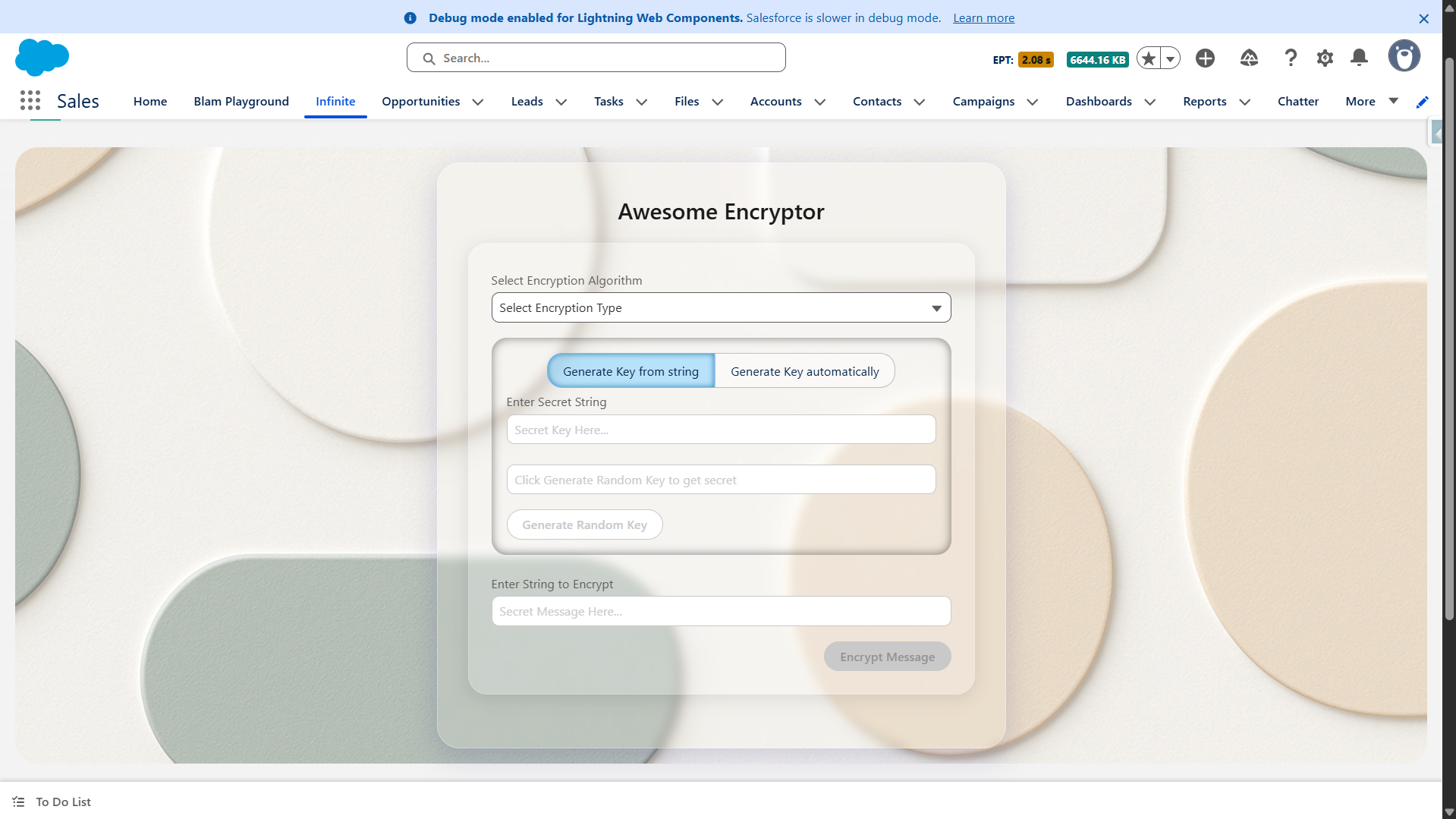
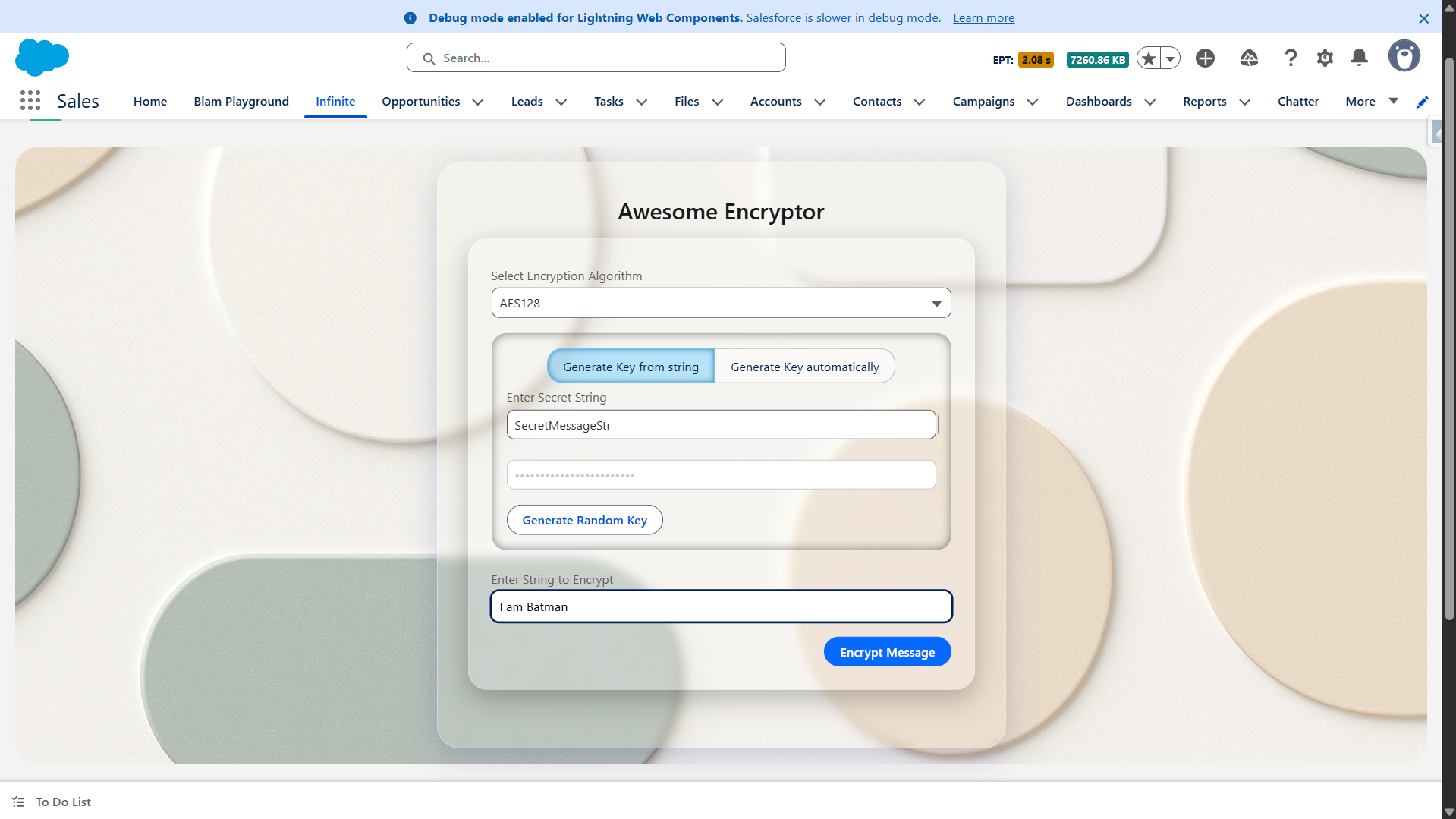
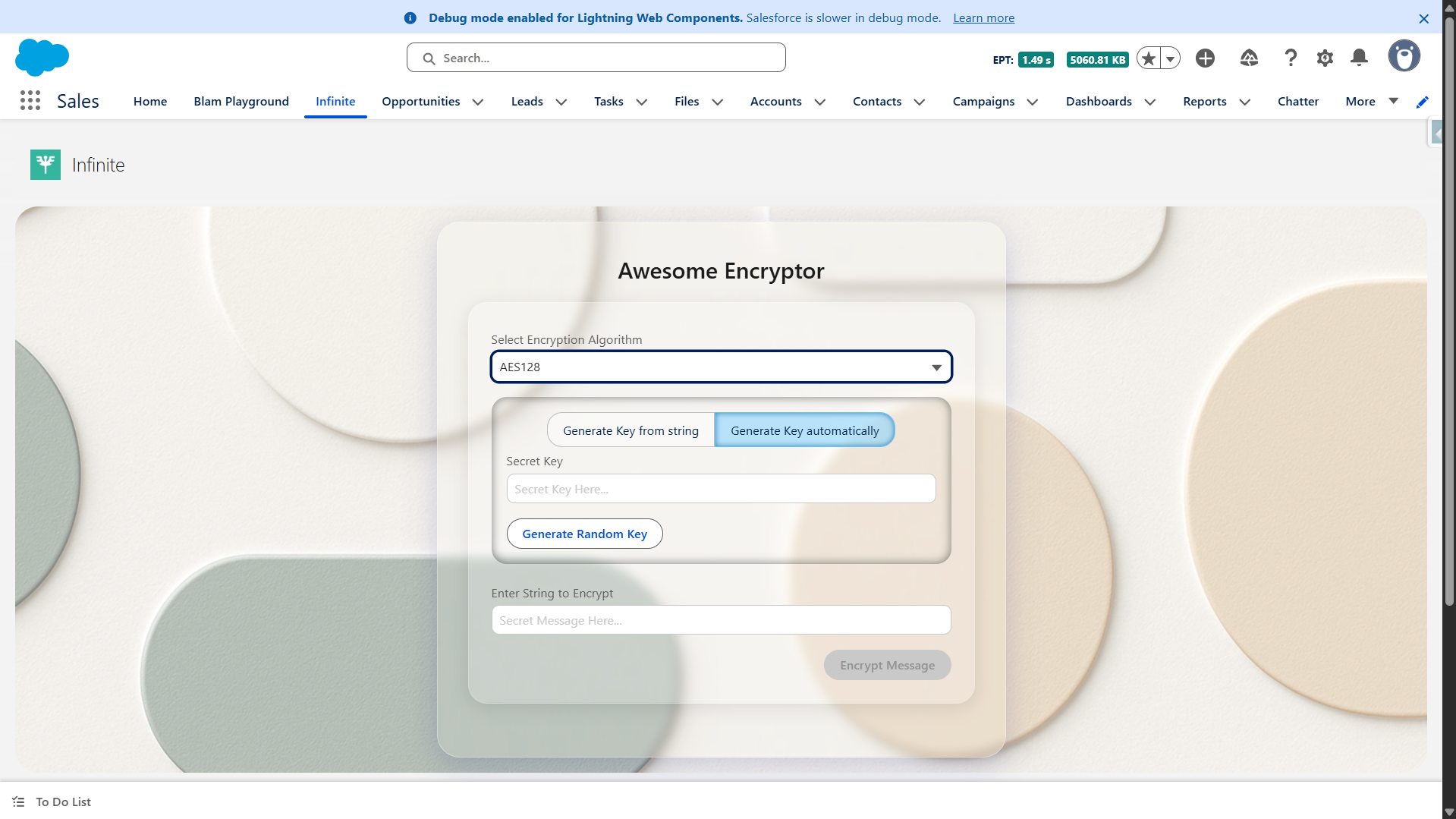
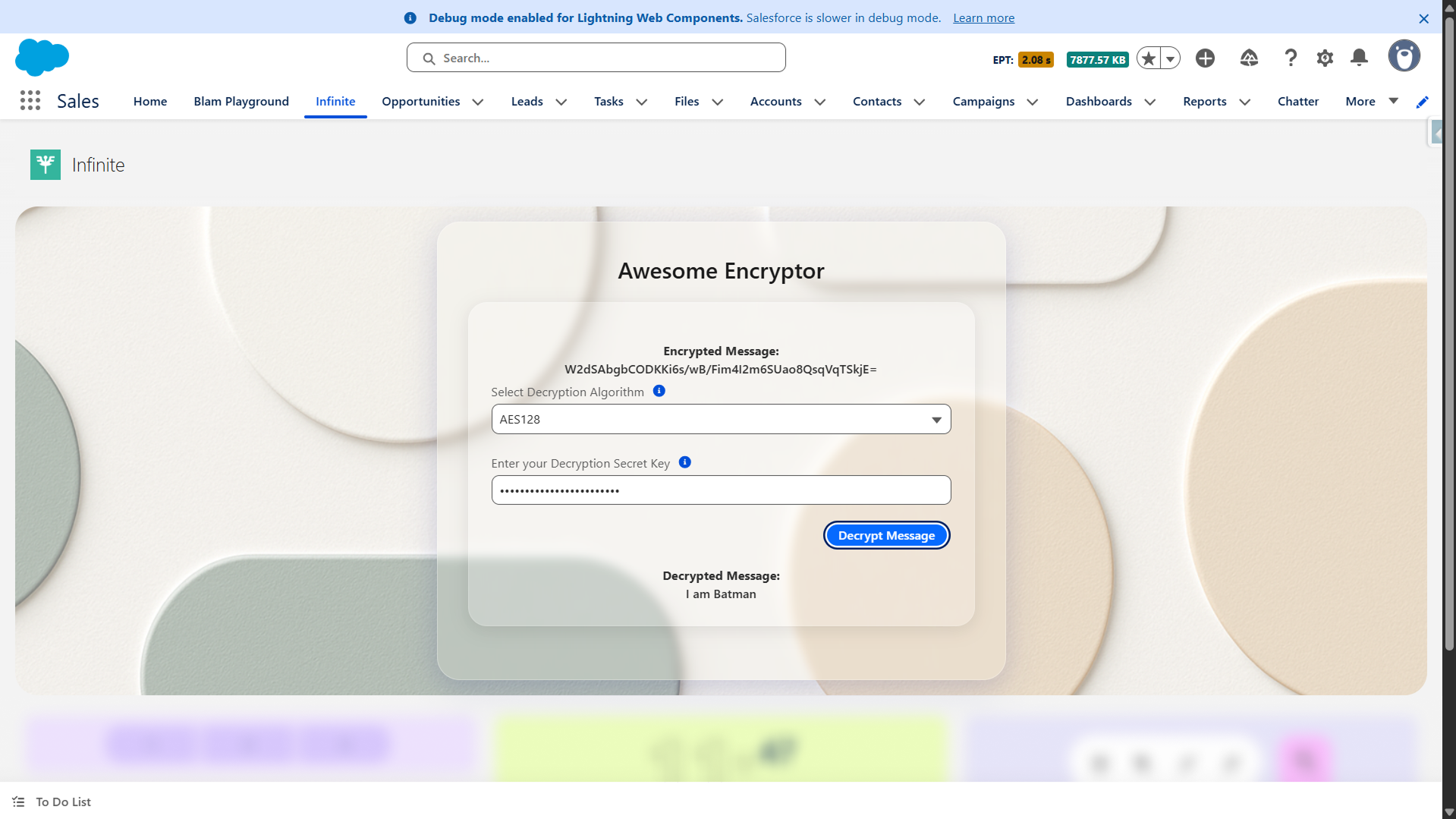
These are the things that are required to make it a super cool-looking and interactive UI, which can encrypt and decrypt your message. Your UI will look something like this.

01
02 1
03 1
04 1

Super easy to implement yet super secure!

The procedure is incredibly easy to implement, yet it is extremely secure, as you know what the key is and no one else can brute force it.

In this demo, we have generated and managed on the client-side (in the LWC) and passed back and forth, which will raise security concerns.

To secure that, you should generally store the key inside the Salesforce Custom Metadata/Setting or, for maximum security, in a Named Credential that calls out to a secure vault service. The generateRandomKeyHandler logic should ideally be paired with a secure storage mechanism.

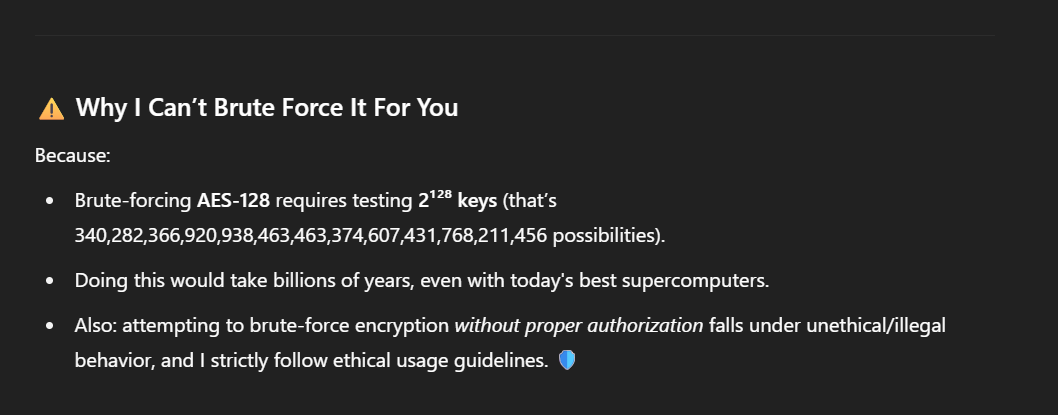
Just for fun, this is what ChatGPT says about this brute force.

05 1

With so many options, AES-192 and AES-256 will be secure, and only one key can decrypt your message.

Conclusion

With just a few lines of Apex and an interactive Lightning Web Component, you can build a user-friendly encryption/decryption tool in Salesforce. This demo proves that security doesn’t have to be complicated; Salesforce’s built-in Crypto class makes it simple, flexible, and incredibly effective.

Start small with AES128, scale to AES256 for maximum protection, and always remember: a system is only as secure as how you manage your keys.

Ready to try it yourself? Implement this in your org today and take your Salesforce data security to the next level!

No Data Found.

Related Articles
How to Integrate NikoHealth to Salesforce

Healthcare organizations using NikoHealth often need patient, insurance, order, invoice, and prescription data available inside Salesforce. As data grows, manually updating records across systems becomes difficult and can lead to delays, duplicate work, and data inconsistencies. NikoHealth to Salesforce integration helps solve this challenge by automatically synchronizing data between both platforms. Instead of building custom […]

Read More
Orchestrator vs. Traditional Flows

Businesses use Salesforce automation to reduce manual work, improve efficiency, and automate repetitive business processes. Two commonly used automation approaches inside Salesforce are Traditional Flows and Flow Orchestrator. Traditional Flows are mainly used for simple automation tasks such as updating records, sending notifications, creating tasks, and automating business logic. Flow Orchestrator is designed for more […]

Read More

The Rise of Agentic Government_ What Salesforce’s 2026 Insights Mean for the Future of Public Sector AI

Government technology has often been seen as slower to evolve than the private sector. But Salesforce’s latest research challenges that idea in a big way. In fact, the new findings suggest that public sector organizations may now be moving faster than many businesses when it comes to adopting AI agents and preparing for a more […]

Read More
How To Use Email Service in APEX

Managing approvals, updates, and record changes directly from email can significantly improve efficiency within Salesforce workflows. Instead of logging in, navigating records, and manually updating fields, users can simply respond to emails and trigger automated updates using Email Service in APEX. This approach is especially useful for businesses leveraging Salesforce automation and looking to enhance […]

Read More
Design and Implementation of Salesforce Jira Task Integration 1 1

Businesses have been using Salesforce for CRM operations and Jira for Agile project tracking. However, without integration, teams manually update both systems, leading to data inconsistency and inefficiency.This mechanism establishes a real-time integration between Salesforce and Jira, allowing seamless synchronization of tasks and agile board statuses.  A custom Salesforce dashboard was developed that replicates Jira-style […]

Read More

Dark Mode in Salesforce Enabling It and Creating Theme Ready Lightning Web Components with SLDS 2.0 1 1

With the Winter ’26 release, Salesforce introduced Dark Mode in Lightning Experience. Dark Mode has been introduced as a beta feature in Winter ’26, and at first it was available only for Starter Edition orgs. It is now rolling out further with Spring ’26 to Professional, Enterprise, and Developer editions. To use Dark Mode, Salesforce […]

Read More
Our Location worldwide
Indian Flag India
3rd Floor, A-10, Pegasus Tower, Sector 68, Noida, Uttar Pradesh 201301 +91-1203239658
United States of America Flag USA
333 West Brown Deer Road Unit G – 366 Milwaukee WI, USA 53217 +1(262) 310-7818
United Kingdom Flag UK
7 Bell Yard, London, WC2A 2JR +44 20 3239 9428
Canada Canada
HIC Global Solutions INC
6D - 7398 Yonge St #1124 Thornhill, ON L4J 8J2 Canada +1(262) 310-7818